Private Android tool for turning photos into fuse-bead patterns
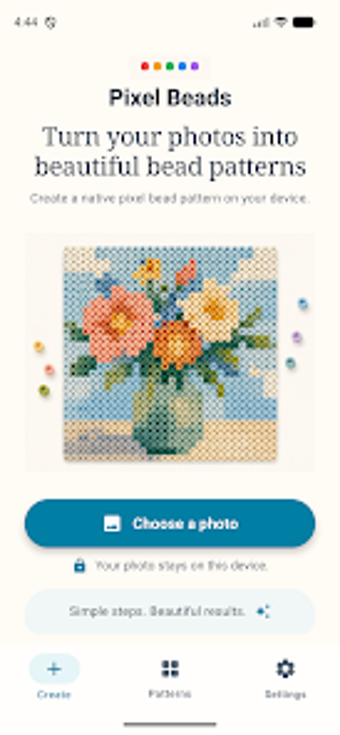
Pixel Beads: Pattern Maker, from JuYi Bai, is an Android utility that turns photos into buildable fuse-bead patterns for hobby crafting projects. It converts images into editable, brand-aware grids with adjustable sizes, manual cell editing, and exportable PNG or printable PDF outputs for assembly. The app performs all processing on-device, stores projects in a local library, and includes material lists and bead codes in exports. It's aimed at bead artists, DIY crafters, and pixel-art hobbyists who need privacy-minded, printable patterns.
How it translates photos into buildable bead patterns
In a typical craft session the app uses the system photo picker to import pictures and performs on-device pattern generation, turning a photo into a structured grid you can actually build. Grid size and color limits control how much detail appears, and a per-cell editor lets you correct stray pixels. The preview modes show either square-grid or round-bead views so you can judge how a finished pegboard will look.
Which bead lines and assembly workflows it supports
The app maps colors to named bead palettes for makers using Perler, Hama, Artkal, and Nabbi, so patterns reference real bead codes. Exported PDFs provide a materials list that doubles as a shopping checklist, and exported images avoid watermarks for clean prints. The generator was adapted from an earlier web tool to deliver pegboard-style reference sheets suitable for workshop layouts and tabletop builds.
How comfortable the editing flow feels during a sitting
Open a photo, tweak the grid, and the editor lets you impose color caps and refine individual cells without network delays. An on-device project library holds saved patterns so you can pause and resume work at leisure. The interface respects light and dark system themes for readable contrast during long sessions, and no account is required to begin crafting immediately.
Why local processing matters for repeatable projects
All computation runs on the device, so source images are not uploaded and projects remain private by design. The developer built the tool with privacy in mind and exports include accurate bead codes to help with material planning. Reports from the crafting community note the app runs without ads, which keeps the focus on pattern creation rather than interruptions.
To sum up: a focused fit for privacy-minded solo crafters
To sum up, Pixel Beads: Pattern Maker is a practical choice for solo bead hobbyists who want device-based pattern creation and clear printable references; it suits makers assembling projects from personal photos. Those needing cloud-backed sync or collaborative editing should expect limits. Pro tip: try several grid sizes during setup to balance shading against bead counts before exporting a final printout.